

Client delivery · Private workspace

OndaSupply Workspace

A private client workspace for project communication, secure files, milestones, previews, billing, and delivery.

The workspace gives each client a clear place to follow the work, review progress, access files, send messages, and understand what is happening next.

Client workspaceProject communicationSecure file accessMilestone trackingBuild previewsProject billingPrivate downloadsRealtime messagesClient-ready dashboardMobile responsive
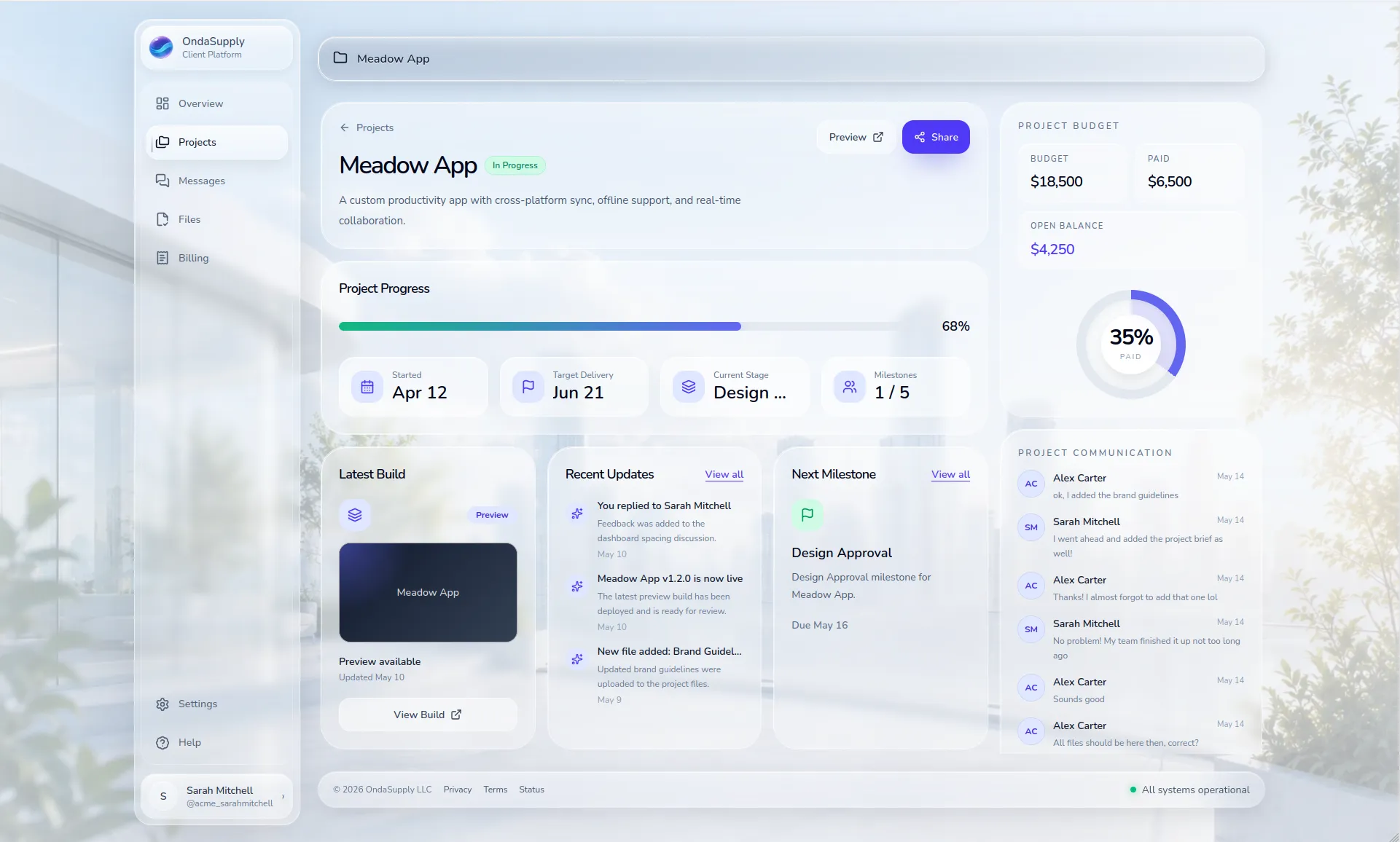
Project workspace
OndaSupply Workspace project screen
The purpose

Less project chaos. More shared clarity.

Many projects end up split across emails, text messages, Drive folders, invoice links, meeting notes, and scattered previews. OndaSupply Workspace brings the working parts together.

It is designed to make client work feel organized from kickoff to launch, without forcing clients into complicated tools.

One place for context

Messages, files, updates, and project status live together.

Private by default

Client files are protected by workspace and organization access.

Built for delivery

Milestones, previews, and billing support the project lifecycle.

Mobile friendly

Clients can check progress or send messages without a desktop.

Communication without scattered threads

Project-specific conversations stay connected to the work.

Realtime messaging keeps clients and the OndaSupply team aligned.

Project pages can show recent communication without leaving context.

Full message history stays available inside the workspace.

Contextual preview feedback

Clients can open staged preview environments directly in the browser.

Feedback pins can be attached to specific interface elements or layout areas.

Comments stay connected to the exact part of the project being discussed.

Preview links can be shared as view-only or restricted collaboration sessions.

Comment permissions can be limited to approved workspace members.

Files that stay protected

Client files are stored behind organization access.

Saved file links still require sign-in and the right workspace access.

Project and organization files can be organized separately.

File categories support documents, assets, invoices, builds, and more.

Progress clients can actually understand

Milestones show what is completed, active, upcoming, or blocked.

Project status and progress are visible without asking for updates.

Previews and staging links can be tied directly to project delivery.

Recent updates help clients follow what changed.

Billing visibility without confusion

Clients can view budgets, paid amounts, and open balances.

Invoices are grouped into a clean billing screen.

Project-level billing context keeps costs easier to understand.

Stripe can handle payment flow while the workspace keeps context clear.

Workspace flow

A project environment from kickoff to launch.

Workspace is not just a dashboard. It is the operating layer around client delivery: access, communication, files, progress, previews, invoices, and support.

That helps every project feel structured, even when the work involves software, infrastructure, local support, or all three.

1

Project created

2

Workspace access

3

Messages + files

4

Milestones + previews

5

Billing visibility

6

Launch + support

Client-ready experience

A polished workspace gives clients a clear and professional place to follow the project.

Protected project assets

Contracts, files, builds, and assets are routed through authenticated workspace access.

Operational trust

Progress, communication, billing, and support are visible without scattered tools.

What this proves

OndaSupply does not just build the work. It builds the delivery environment around it.

Workspace shows how OndaSupply approaches client projects: structured communication, secure access, clear milestones, real previews, billing context, and a calmer process from start to finish.